
Pick yourself or scan your player QR so the match counts for your stats
A linked player's result lands on their profile and stats. A typed name is still scored, just not linked.
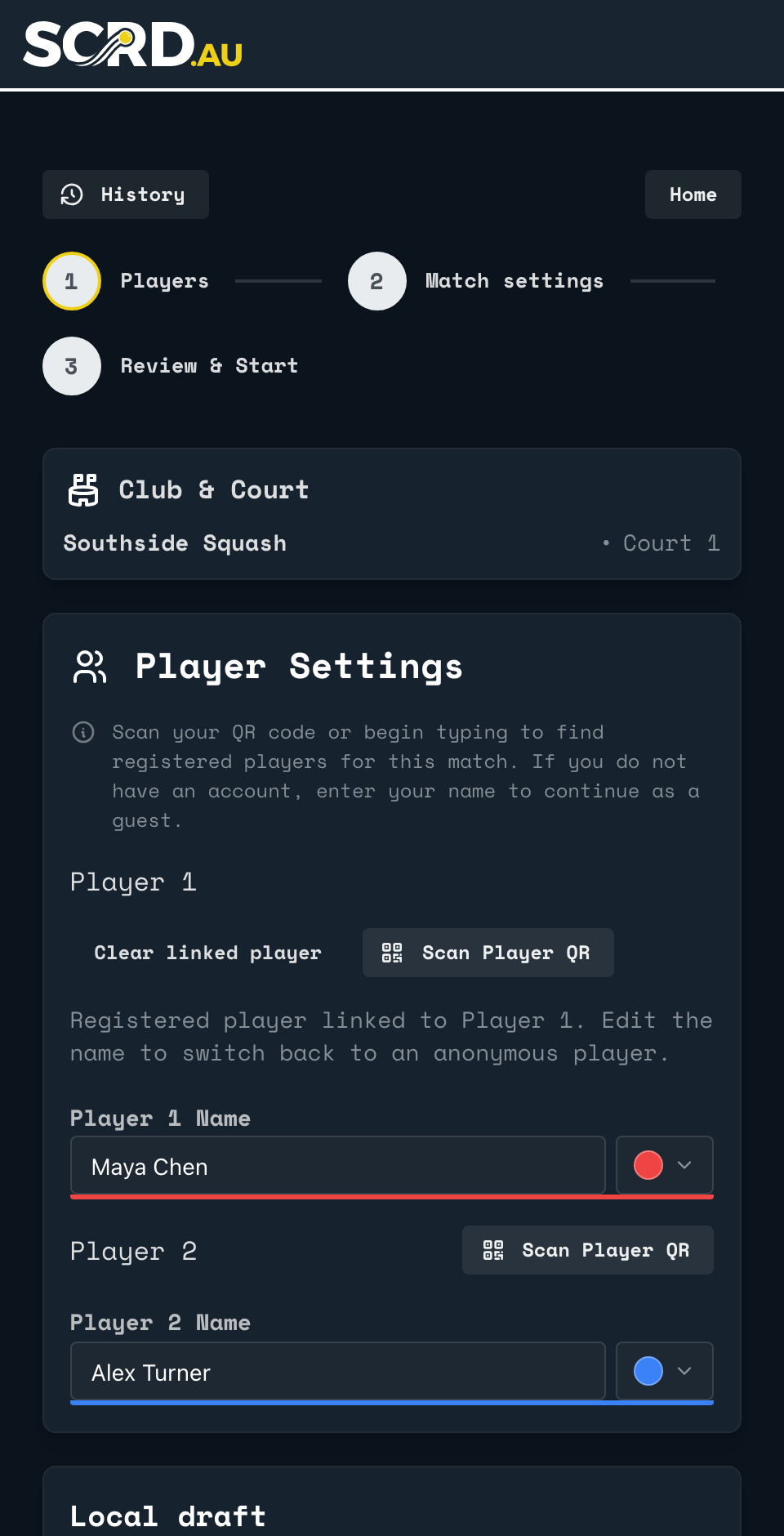
Two ways to link a player slot to a real profile: pick the name from the list as you type, or scan that player's QR code. Either way, the result lands on their profile and in their stats. A typed name that matches nobody is a guest: SCRD still scores and saves the match, just not against a profile.
Link a player as you type
- Start typing the player's name in Player 1 Name or Player 2 Name. SCRD offers registered players whose home club is this one.
- Pick the right one from the list. The line above the name then reads Registered player linked to Player 1 (or Player 2), and a Clear linked player button appears. Editing the name afterwards unlinks the player.
- Not in the list? The list only offers players whose home club is this one, so a player with an account from elsewhere should use Scan Player QR. Only a player with no account should keep the typed name: they are a guest for this match.
Scan a player QR instead
Your own player QR is on your profile, under EDIT PROFILE: tap LOAD PLAYER QR there. At setup, tap Scan Player QR next to a slot and hold up that code. SCRD links the player in one step, without typing.
Back to the court
Point your phone's camera at the code on the court wall or the court TV. It opens the setup page for that court.
Open app.scrd.au